Choosing depth over breadth
Kaspars Dancis · November 20, 2025



Use cases from the Whimsical team


We’ve added something new to help you keep related work together: tabbed folders. They let you group everything for a project, client, initiative, timeline, or workflow into a single view, so you can move between related pieces of information without losing your place, or your mind.
Think of tabbed folders like browser tabs, but for your docs and boards. Click between them, and you’re right where you need to be, without jumping back and forth through the folder hierarchy.
We're fully remote and async at Whimsical, spread across nearly every time zone from California's beaches through Seville to Middle-earth (aka New Zealand). That also means written content really matters to us—it’s how we communicate.
What we've learned is that creating helpful resources is one thing, but making sure people can actually find and use them without losing the plot? That's the harder bit.
We've just dipped our toes into using tabbed folders, and two places where they've made sense immediately: organizing company get-togethers and all-hands support.
Twice a year, we come together for a week-long company gathering we call summits. But that one week represents close to six months of prep work.
There’s the early planning phase, where we pick a destination, choose and book a hotel, coordinate flights, set up the agenda, book team activities, sort out dinner groups, and book all the dinner spots.
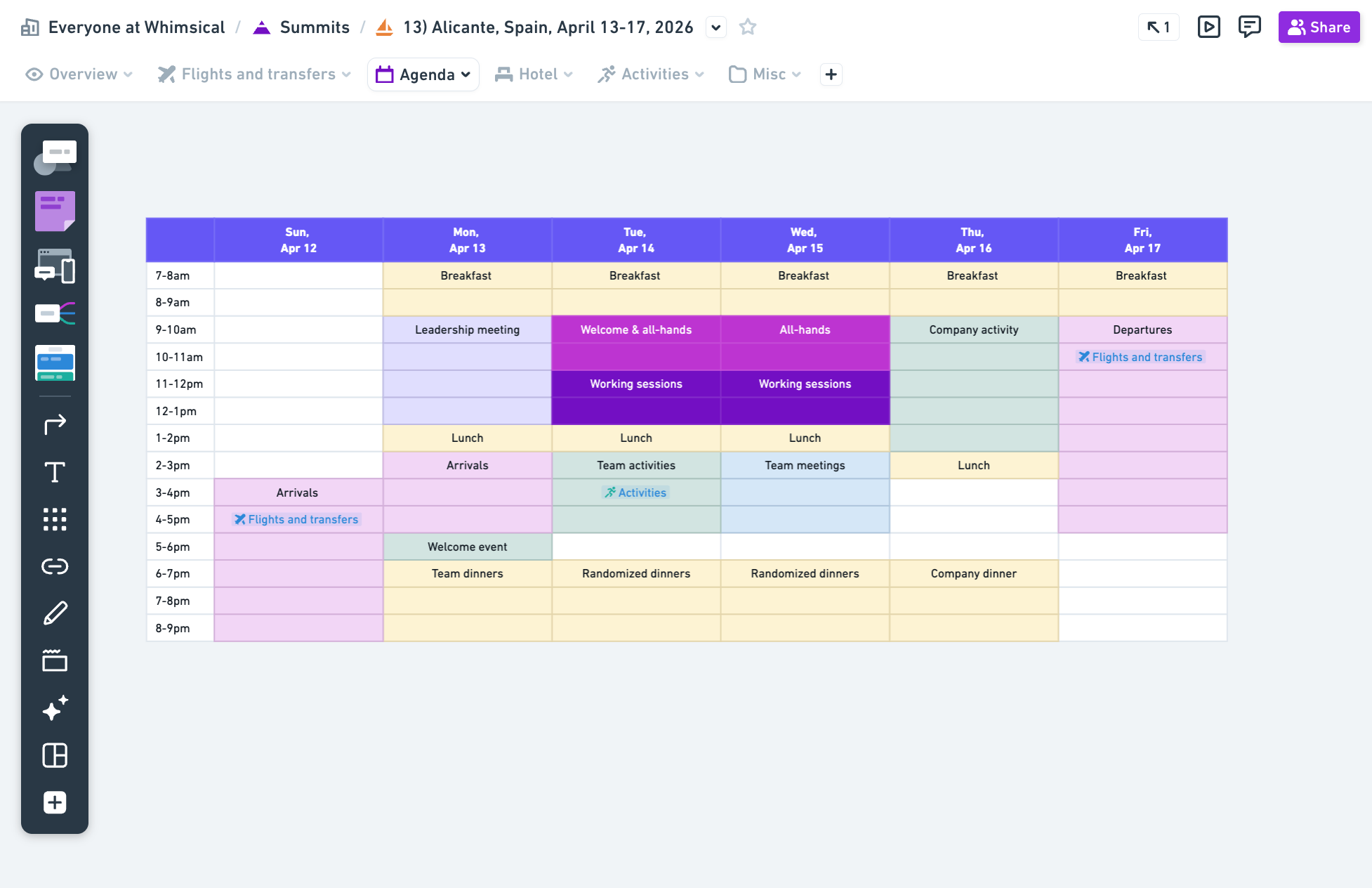
Then comes the summit week, mixing a whole lot of fun with more serious strategy sessions, brainstorming, and demos.
After the summit wraps up, there’s still more to do. We share photos, send out a survey to understand what worked and what we’d change next time, and capture decisions and takeaways. And once that post-work is done, we’re already rolling straight into planning the next summit six months later.
That’s a lot of moving parts spread across a long stretch of time. So when someone wants to check if they’re on the same flight as a teammate or reference decisions made during the summit, tabbed folders keep it all in one place. Every phase lives side by side, so you can move between them without breaking your flow.
Customer Day is a tradition as old as Whimsical itself. One day a week, two people from anywhere in the company handle customer support. It doesn’t matter if they’re in engineering, design, or operations. Occasionally, that means your question can land directly with one of our co-founders, too.
This practice helps us all stay close to the people using Whimsical. Even after we built a dedicated support team, keeping Customer Days was a no-brainer. The perspective that comes from talking directly with customers, and the empathy you build for folks working in support, are a big part of why we keep doing it.
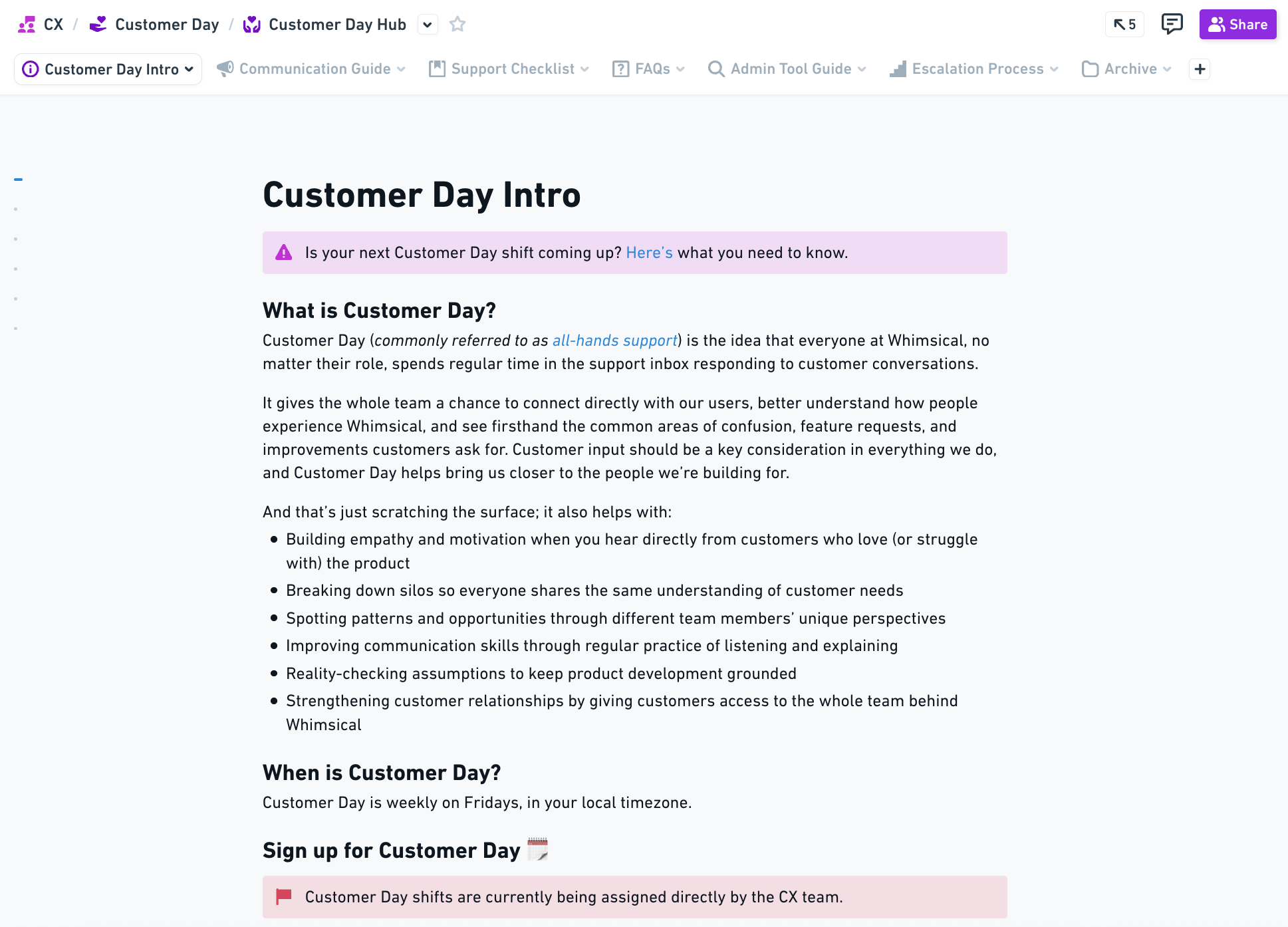
But let's be honest, doing customer support can feel overwhelming if it's not your everyday job. And since we're async, you can't always tap someone on the shoulder for help. Our “Customer Day hub” is a tabbed folder with everything you need—how to use our support tool, how to handle common issues, where to escalate tricky questions, response guidelines, etc.
We’ve always had resources available for Customer Day, but tabbed folders have made them much easier to use. Forgot what the escalation process is? Click that tab. Looking for the FAQ? It's right next to it.
We’re starting to see how customers are using tabbed folders in the wild. Some use them to organize client work - keeping kickoff notes, mockups, and revisions all together so everything a client needs is easy to find and just a tab away.
Others apply the same idea to product work, using tabbed folders to group roadmaps, active projects, and related thinking in one place.
And yes, we've also had a colleague organize their wedding this way with mood boards, guest lists, vendor contacts, seating plans, and RSVP tracking.
It doesn't matter if it's a work project or a life event, the goal here is simple—make information easier to find, use, and engage with. It’s like having the full route mapped out, instead of figuring things out one turn at a time.
We’re really curious to see how you end up using tabbed folders. If you have thoughts, questions, or feedback, we’d love to hear from you at hello@whimsical.com.