


- 2023.48
Rotate images in boards
You can now rotate images on Whimsical boards. If an image gets accidentally uploaded upside down, give this feature a spin.
- 2023.47
Whimsical Diagrams GPT
If you're a ChatGPT Plus user, you can now generate flowcharts, mind maps and sequence diagrams in ChatGPT with the Whimsical Diagrams GPT.
- 2023.46
Sequence diagram actors

Whimsical now has a native tool for creating sequence diagrams. To get started, click the diagram shapes menu, then select sequence diagram actor. Combine sequence diagram actors with connectors to build and scale any sequence diagram.
- 2023.45
Whimsical AI for sequence diagrams
Need to create a technical or process diagram? Consider it done. You can now create sequence diagrams instantly with Whimsical AI. To get started, select generate with AI from the toolbar, enter a text prompt, select sequence diagram, then create. Checkout this demo video for more info.
- 2023.44
Paste as options that format content for you

Decide how pasted content comes to life with new pasting options for docs and boards. Just copy content, then right-click and paste as a mind map, sticky note(s), card(s), table or bulleted list.
- 2023.43
Improved file search when adding links
We’ve made it easier to create and share links to files across your Whimsical workspace. The ‘Add link’ menu will now allow you to search files, as well as suggest files based on highlighted text. No more tab switching needed!
- 2023.42
Filter selection

You can now filter a selection of items down to just the ones you want. Select items on a board, click the filter menu, and choose a shape or color. Presto: the matching items are selected! Try it out the next time you need to move or style items in bulk.
- 2023.41
Paste mermaid text as a flowchart
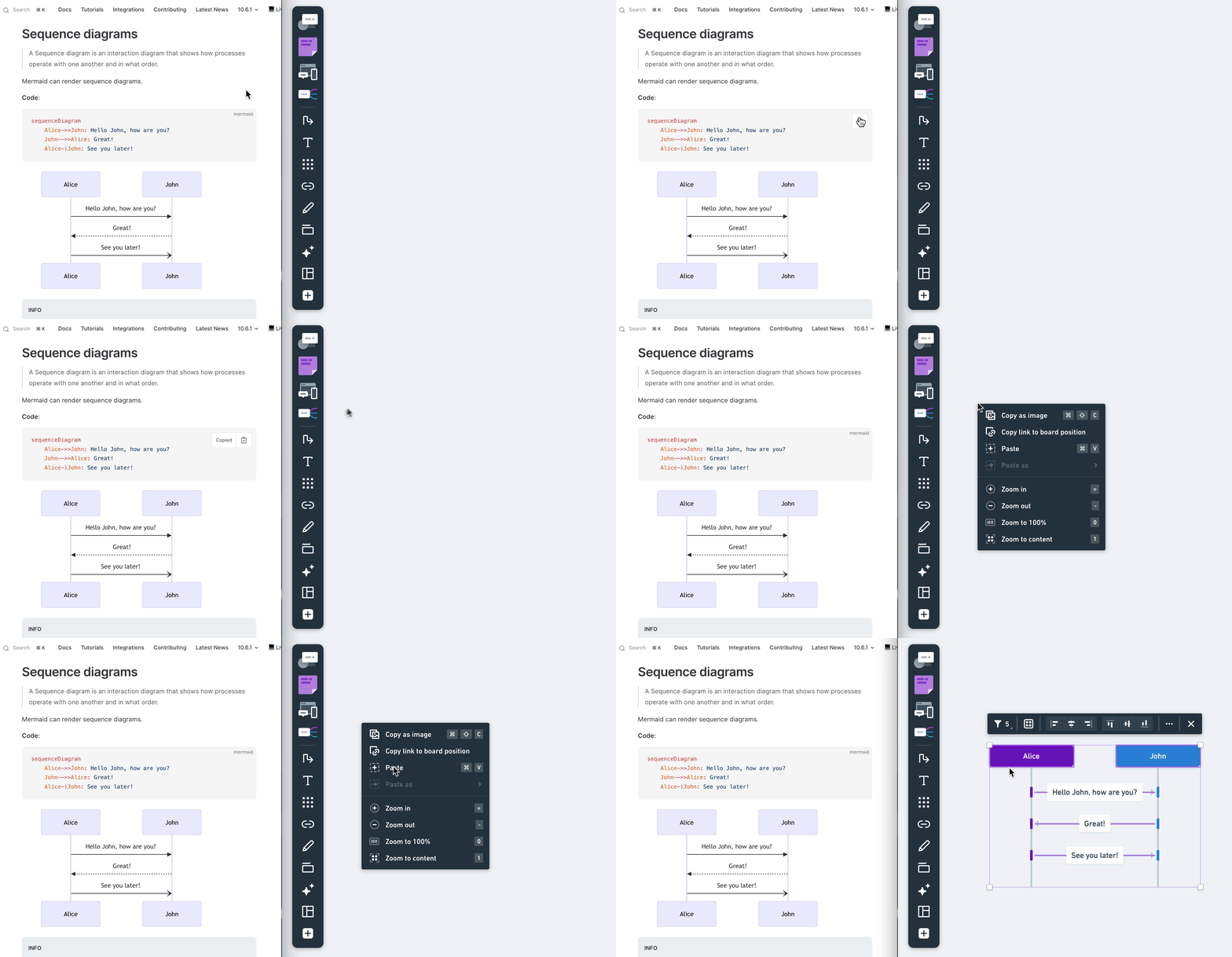
You can paste mermaid as Whimsical flowcharts and sequence diagrams.
Mermaid is a diagram format written in plain text. It is often stored alongside source code or other technical documentation.Once pasted, you can immediately start editing and customizing your flowchart. Add new steps, change texts, or adjust the design to make it fit your needs. This feature makes it simple to bring in diagrams from other tools or documents and continue working on them in Whimsical.
Get started by pasting this example flowchart into a board:
graph TD A[User requests password reset] B{Is the user registered?} A --> B B -- Yes --> C[Send password reset link to user's email] C --> D[User receives password reset link] B -- No --> E[Inform user that they are not registered] - 2023.40
File mentions and previews
Mentions for files have been improved. When you paste a Whimsical link into another Whimsical file, the link will now automatically convert to a mention, removing the bloat of raw URLs. You can also preview the file in a thumbnail on hover.
- 2023.39
SCIM is now generally available for JumpCloud
Customers that use JumpCloud for identity management can now add and remove workspace members with SCIM. Using SCIM lets your organisation centralize user management, and streamline onboarding and offboarding of users to Whimsical. This feature is available to customers on our Org plan.
Learn more about enabling SCIM for JumpCloud, or contact sales to upgrade to an Org plan.
Brand
Get all logo versions.
Download