Releases
Our latest features and improvements to help you work with more focus and less friction.
- 2024.30
Notification inbox
We’ve released the notification inbox, a centralized space for all your Whimsical workspace activity. You’ll receive alerts for comments, mentions, reactions, file invites, and access requests. You can also customize your email settings to stay focused and minimize distractions. We hope this feature helps you manage your work both efficiently and calmly in Whimsical.
- 2024.29
SAML session expiration notices

Users logging in with SAML will now see a notice before their session expires. This lets them re-authenticate at a convenient time, instead of being interrupted in the middle of their work.
The warning will show 2 hours, 1 hour, and 10 minutes before your session expires.
This feature is available for all workspaces with a timed SAML session expiration policy. Learn more about SAML session expiration.
- 2024.27
AVIF Image Support in Boards and Docs

We now support AVIF image files in Whimsical boards and docs. AVIF, a next-generation image format, offers better compression and quality, wide color gamut, and high dynamic range (HDR), meaning your pictures will look sharper while taking up less space. This ensures that your images load faster without sacrificing quality.
AVIF support is available for all users. You can add an AVIF image by selecting “Upload image” from the toolbar, or by dragging it from your computer onto a board or doc.
- 2024.26
ERD endpoints for connectors

We added four new endpoints to make your next database model even nicer in boards. To customize an endpoint, select the connector and click on the three dots next to it.
- 2024.25
Desktop app for macOS

We’ve released a desktop app for macOS. Enjoy everything you love about Whimsical in the browser plus a more permanent home for your Whimsical work, tabs for better organization, keyboard shortcuts for moving between tabs, and a beautiful icon for your dock.
- 2024.24
Code blocks in text objects

Now you can add code blocks in boards, similar to docs. Simply highlight your code snippet in a text object, choose the code block type and you’re good to go.
- 2024.23
Request File Access

If you open a Whimsical link you don’t have permission to view, you can now easily request access from within Whimsical. To request access, simply click on the file link, and you’ll see the option to “Request Access” on the access denied page. You can also include an optional note to accompany your access request. The owner will receive an email notification and can grant access with just a click.
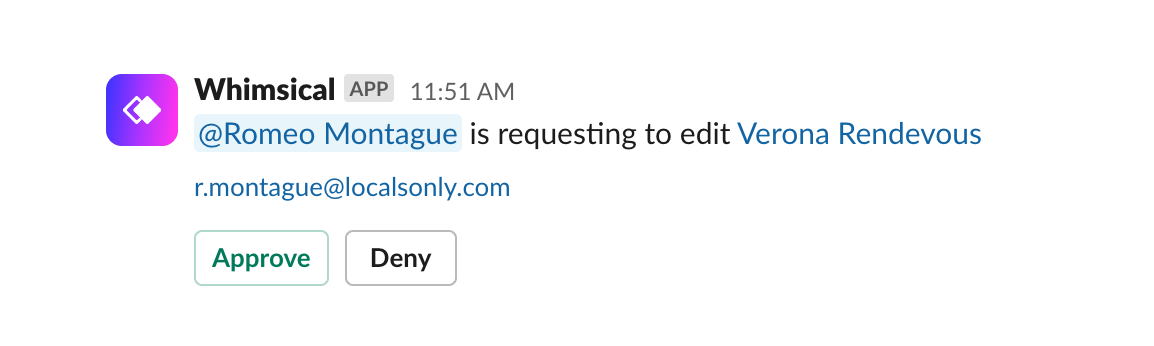
If you have the Whimsical integration for Slack installed, you can also approve the access request from within Slack.
Note that you must be a member of the same workspace as the file’s owner to request access to the file. This ensures that sensitive information remains secure within your team’s environment. Learn more about requesting access to files.
- 2024.22
User offboarding

Managing the departure of users from your workspace just got easier with our new user offboarding feature. Now, you can automatically set a departing user’s “My files” to be transferred to a designated folder after a default waiting period of 72 hours. This allows for a grace period before file relocation, ensuring that files aren’t accidentally moved. Additionally, when manually offboarding a user, you have the flexibility to move their files immediately, after the 72-hour window, or opt to leave the files in their current location.
You can set a user offboarding folder at https://whimsical.com/workspace/settings or read the documentation on user offboarding.
- 2024.21
More detailed workspace information

It’s easy to get lost if you're a member of multiple workspaces, so you can now see more details about each one—including the subscription plan and the total number of members.