Whimsical LogoWhimsical LogoWhimsical Logo

Brand
Get all logo versions.
Download

Product Requirements Document (PRD)

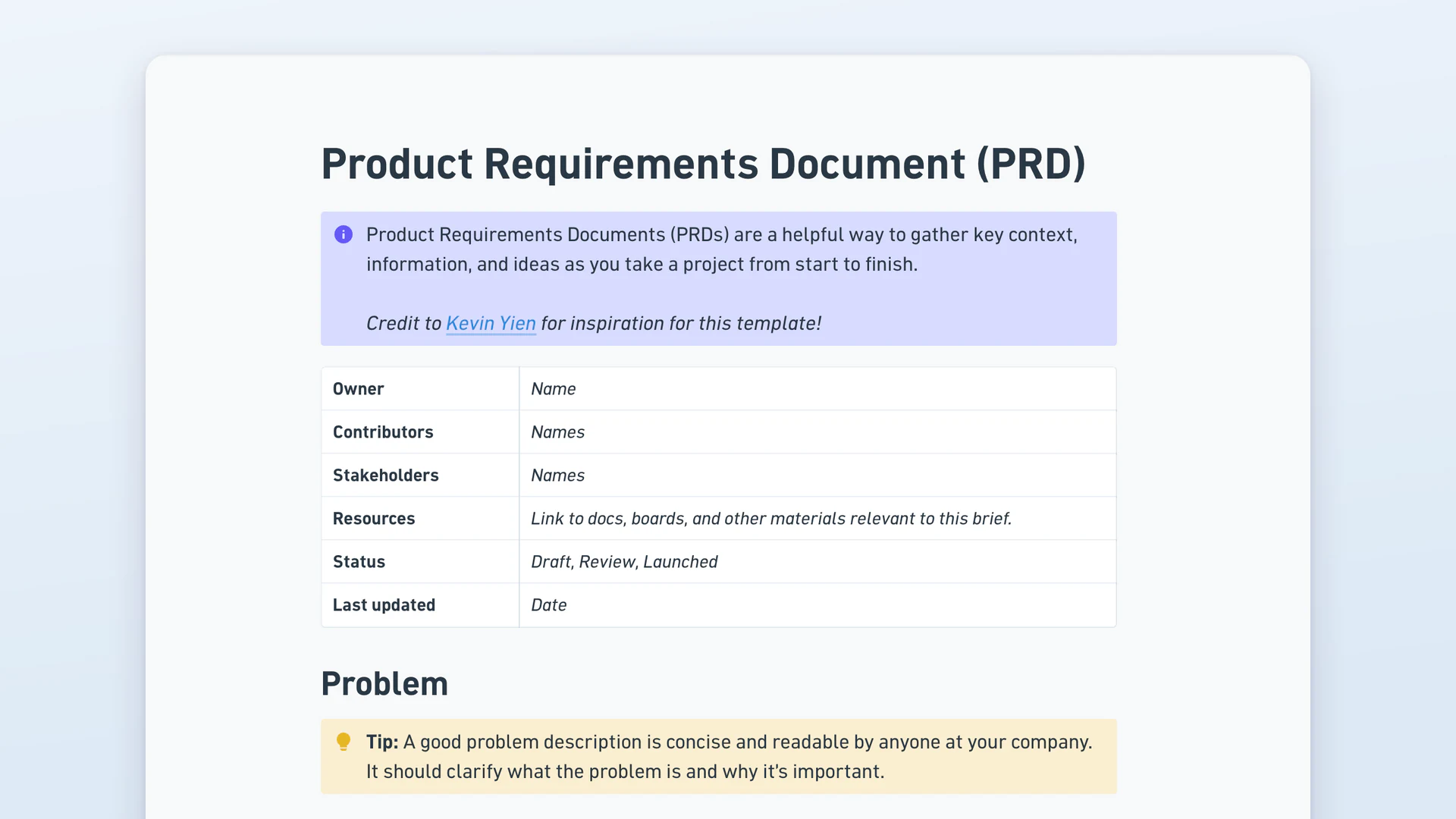
A product requirements document, or PRD, sets out what a team is building and why: the problem, the solution in outline, what's deliberately out of scope, and how it reaches customers. This template opens with an owner and status header, then runs Problem and Impact, Solution Outline with key features, flows and no-gos, a Launch Plan with milestone exit criteria, and a checklist by team. Product managers write one before build starts.

Owner header, problem, solution outline with no-gos, milestones with exit criteria.

What's included

  • An owner and status header. A six-field table for owner, contributors, stakeholders, resources, status (draft, review, launched) and last updated.
  • Problem and Impact. Room for the problem, the evidence behind it, and the goals or metrics that decide whether it worked.
  • A no-gos section. An explicit list of related problems left out, which is the section that stops scope creeping mid-build.
  • A nested board for key flows. An embedded slot for user flows or wireframes comparing current and proposed experience.
  • A milestone table with exit criteria. Internal pilot, beta, early access and public launch, each with a written bar to clear: no P0 or P1 bugs on a rolling 7-day basis, for one.
  • An operational checklist by team. Rows for analytics, sales, product marketing, customer success, marketing and localization, each with a status.

Why write a PRD?

  • Exit criteria beat target dates. Each milestone carries a condition to meet, so beta ends when the bar is cleared rather than when the calendar says so.
  • No-gos are written down. Naming what's out of scope in the doc means the question gets settled once instead of resurfacing every sprint.
  • Every team's dependency is visible. The operational checklist shows analytics tracking or sales enablement sitting incomplete weeks before launch, not the day before.
  • One owner, one status. The header says who's accountable and whether the doc is draft or final.
  • Decisions survive the project. The changelog records what changed and why, so the reasoning survives the project.

How to use this template

  1. Duplicate the template. Copy it into your workspace, name it after the feature, and set the status to draft while you write.
  2. Write the problem with evidence. Describe what's broken for customers and attach the data or screenshots that show it, before proposing anything.
  3. Outline the solution and the no-gos together. List the prioritised features, then immediately write what you're not doing, because the boundary is the useful half.
  4. Set exit criteria per milestone. Give internal pilot, beta, early access and public launch a written condition each, not just a target date.
  5. Fill the operational checklist. Work through analytics, sales, product marketing and customer success, marking what each team owes and its status.
  6. Share it for review. Flip the status to review, circulate it, and log the outcomes of the discussion in the changelog.

PRD vs BRD vs product spec

These three sit at different layers. A business requirements document, or BRD, states the business case and the organisational need. A product requirements document translates that into what the product must do: the problem, the features, the flows, the success measures. A product spec, written by engineers or designers, defines how it gets built. BRD is the why, PRD is the what, spec is the how.

Frequently asked questions

  • A PRD, or product requirements document, is the document that defines what a team is building and why. It covers the problem being solved, the evidence it matters, the outline of the solution, what's explicitly out of scope, and how the work reaches customers. Product managers write it before development starts, so design and engineering are working from the same brief.

  • A product requirements document keeps a project's scope, reasoning and dependencies in one place. Engineering reads it to know what to build, design reads it for the flows, and teams like analytics and support read it to see what they owe before launch. It also functions as a record: when someone asks why a feature works a certain way, the PRD holds the answer.

  • Start with the problem and the evidence, not the feature. Then outline the solution as a prioritised feature list, and write the no-gos immediately after so scope has a boundary. Add milestones with exit criteria rather than dates alone. Any sample product requirements document worth copying has a no-gos section, and it's the one most people skip.

  • This template ships with four. Internal pilot ends when there are no P0 or P1 bugs on a rolling seven-day basis. Beta ends when a set number of customers say they'd be disappointed if you removed the feature. Early access ends once a number of customers convert from competitors. Public launch moves to measure and monitor. Each is checkable, unlike "beta looks good".

  • Six do most of the work: a header naming the owner and status, the problem with supporting evidence, the impact or success metrics, a solution outline with key features and no-gos, a launch plan with milestones, and an operational checklist covering what other teams need. An appendix for open questions, FAQs and a changelog catches everything that doesn't fit.