

- What is Whimsical?
- Getting started with flowcharts
- Getting started with mind maps
- Getting started with wireframes
- What can you do with Whimsical?
- Using Whimsical Boards
- How to create a new workspace
- AI-assisted mind mapping
- Working with Whimsical's infinite canvas
- 5 ways to create a new file
- Customizing file and folder icons
- Mentions in Whimsical files
- Customizing diagram shapes
- Getting started with sequence diagrams
- Using the command menu
- Getting started with flowcharts
- Getting started with mind maps
- Getting started with wireframes
- Using Whimsical Boards
- Mentions in Whimsical files
- Customizing diagram shapes
- Using sections on the Whimsical canvas
- Sketch on the canvas with freehand drawing
- Annotating files for more detail
- Adding and displaying links in Whimsical files
- Linking to sections and objects
- Uploading files to Whimsical
- How to draw a line
- How to filter selected objects
- Markdown support in Whimsical
- Presenting in Whimsical
- Voting on sticky notes
- Using the timer in boards
- Working with the grid and auto-alignment
- Working with connectors
- Does Whimsical have cloud architecture icons?
- Using tables in Whimsical
- Using sticky notes in boards
- Optimizing performance in larger boards
- Using spellcheck
- Setting custom thumbnails
- How overlays work in Wireframe mode
- Why are the colors of some board objects toned down?
- Syntax highlighting in code blocks
- How to add emojis
- Commenting in Whimsical files
- Hiding cursors while collaborating
- Measure between objects in Boards
- Getting started with sequence diagrams
- Keeping boards tidy with alignment, distribution, and auto-layout
- Save default object style
- Import
- Text-to-object pasting options
- Mermaid code in Whimsical
- Whimsical Agent
- Whimsical app for ChatGPT
- AI-assisted mind mapping
- AI Supplementary Terms
- Whimsical connector for Claude
- Whimsical connector for Grok
- How to get the most from your AI credits
- Using Whimsical with Microsoft Copilot Studio
- Whimsical plugin for Cursor
- Mobbin integration for wireframing
- MCP
- Whimsical MCP
- Whimsical MCP - supported tools
- Teams, workspaces & sections explained
- Free viewers commenting in workspaces
- Team FAQs
- Customizing file and folder icons
- Collaborating with others in real time
- Sharing files and managing access permissions
- How to switch between workspaces
- How to draw a line
- How to filter selected objects
- Markdown support in Whimsical
- Does Whimsical have cloud architecture icons?
- Embedding external content into Whimsical
- How overlays work in Wireframe mode
- Moving and copying files
- Using Whimsical on mobile
- Time machine: file version history
- Why are the colors of some board objects toned down?
- Does Whimsical support offline mode?
- Does Whimsical work on iPad?
- Whimsical desktop app
- Is Whimsical available in other languages?
- Inverting the zoom direction in Whimsical so it works more like Sketch
- Troubleshooting issues and reporting bugs
- How to add emojis
- How to restore deleted files from the trash
- Searching in your Whimsical workspace
- Organizing files in your workspace
- I’ve upgraded but still don’t have access to the paid features
- Why can't I edit my files?
- Reporting content in Whimsical
- Does Whimsical have an affiliate or referral program?
- Hiding cursors while collaborating
- Sharing feedback and feature requests
- Free plan limits
- Dark mode in Whimsical
- Notification inbox
- How to change or reset your password
- Inverting the zoom direction in Whimsical so it works more like Sketch
- Customizing your notifications in Whimsical
- How to verify your Whimsical account
- How to delete your account
- Adding your name and avatar to your account
- Changing your account email address, or adding a new one
- Updating the credit card details on your account
- How billing works in workspaces
- Updating your billing information
- I’ve upgraded but still don’t have access to the paid features
- How to cancel your subscription
- Pricing and discounts
- Where are my invoices
- Understanding your Whimsical invoice
- Sales tax and VAT
- How to create a new workspace
- Teams, workspaces & sections explained
- Free viewers commenting in workspaces
- Requesting file access
- Workspace discovery settings
- Sorting files and folders
- Changing workspace members’ roles
- Adding and removing members
- Team FAQs
- Creating and managing teams
- Requesting workspace editor access
- Linking between files
- Member roles in Whimsical
- How to delete a workspace
- How to upgrade your workspace
- Guest access
- Changing your workspace name, logo, or URL
- Collaborating with others in real time
- Offboarding users
- Sharing files and managing access permissions
- How to switch between workspaces
- Consolidating workspaces
- Uploading files to Whimsical
- SAML
- Setting up SAML session expiry
- Security
- Prevent new workspace creation
- Export
- Exporting content from Whimsical
- Embedding Whimsical files
- Import
- Importing to Whimsical
- Text-to-object pasting options
- Mermaid code in Whimsical
- Switching to Whimsical
- Moving from Miro to Whimsical
- Moving from FigJam to Whimsical
- Moving from Lucidchart to Whimsical
- Moving from Lucidspark to Whimsical
- Moving from Excalidraw to Whimsical
- Moving from tldraw to Whimsical
- Moving from Canva to Whimsical
- Moving from Visio to Whimsical
- Moving from Mural to Whimsical
- Moving from draw.io to Whimsical
- Moving from Microsoft Whiteboard to Whimsical
- Whimsical app for ChatGPT
- Whimsical connector for Claude
- Whimsical connector for Grok
- Embedding & integrating boards with Jira Issues
- Integrating Whimsical with Google Docs
- Embedding files in ClickUp views
- Embedding files in Asana
- Creating Jira & Confluence Smart Links for Whimsical Files
- Embedding files in Guru
- Embedding files in Trello
- Embedding & integrating boards in Notion
- Integrating Whimsical and GitHub
- Embedding files in Zendesk
- Support Whimsical embeds in your app with EmbedKit
- Whimsical previews and notifications in Slack
- Embedding files in Canva
- Integrating Whimsical and Linear
- Embedding files in Nuclino
- Embedding files in Monday
- Embedding files in Medium
- Embedding files in Slab
- Embedding files in Superhuman Docs (ex Coda)
- Whimsical API (Beta)
- Embedding boards in Obsidian
- Using Whimsical with Microsoft Copilot Studio
- Mobbin integration for wireframing
- Export
- Embedding Whimsical files
- MCP
- Whimsical MCP
- Whimsical MCP - supported tools
- Reporting content in Whimsical
- SAML
- SAML SSO in Whimsical
- SAML SSO with Okta
- Setting up SAML session expiry
- SAML SSO with Auth0
- SAML SSO with OneLogin
- SAML SSO with Microsoft Entra ID (Azure AD)
- SAML SSO with Google Workspace (previously G-Suite)
- SAML SSO with Active Directory Federation Services (ADFS)
- SAML SSO with other identity providers
- Managing email changes with SAML and SCIM
- SCIM
- Setting up SCIM with Okta
- Setting up SCIM with JumpCloud
- Setting up SCIM with Entra ID (Azure AD)
- SCIM provisioning with Groups in Okta
- SCIM user provisioning in Whimsical
- SCIM provisioning with Groups in Entra ID (Azure AD)
- Security
- Setting up Two-factor Authentication (2FA)
- Prevent new workspace creation
- Whitelisting Whimsical domains
- Signing in with your Whimsical account on multiple devices
- Contact us
Mermaid code in Whimsical
Mermaid is a text-based syntax for describing diagrams in code.
Whimsical turns Mermaid code into editable diagrams on your board, from flowcharts and sequence diagrams to kanban boards and architecture diagrams. Many of them turn back into Mermaid when you need the code.
Where Mermaid works in WhimsicalCopied!Link to this section
- Paste onto a board. Copy Mermaid code from anywhere, like docs, GitHub or an AI chat, and hit
Command+V(Mac) orControl+V(PC) on a board. You get editable shapes and connectors, not a picture. - Paste into a doc. Paste Mermaid into a doc, on its own, in a
```mermaidcode block or inside a longer answer from an AI chat. Each diagram becomes a board nested in the doc. Undo once to turn it back into code. Mermaid in a doc's code blocks also gets syntax highlighting. - AI and MCP. The in-app AI and the Whimsical MCP (in Claude, ChatGPT and the desktop app) draw diagrams from Mermaid too, so what they make matches what you'd get from pasting.
- Copy as Mermaid. Select a diagram, right-click and choose Copy as… → Mermaid to take it back out as code.
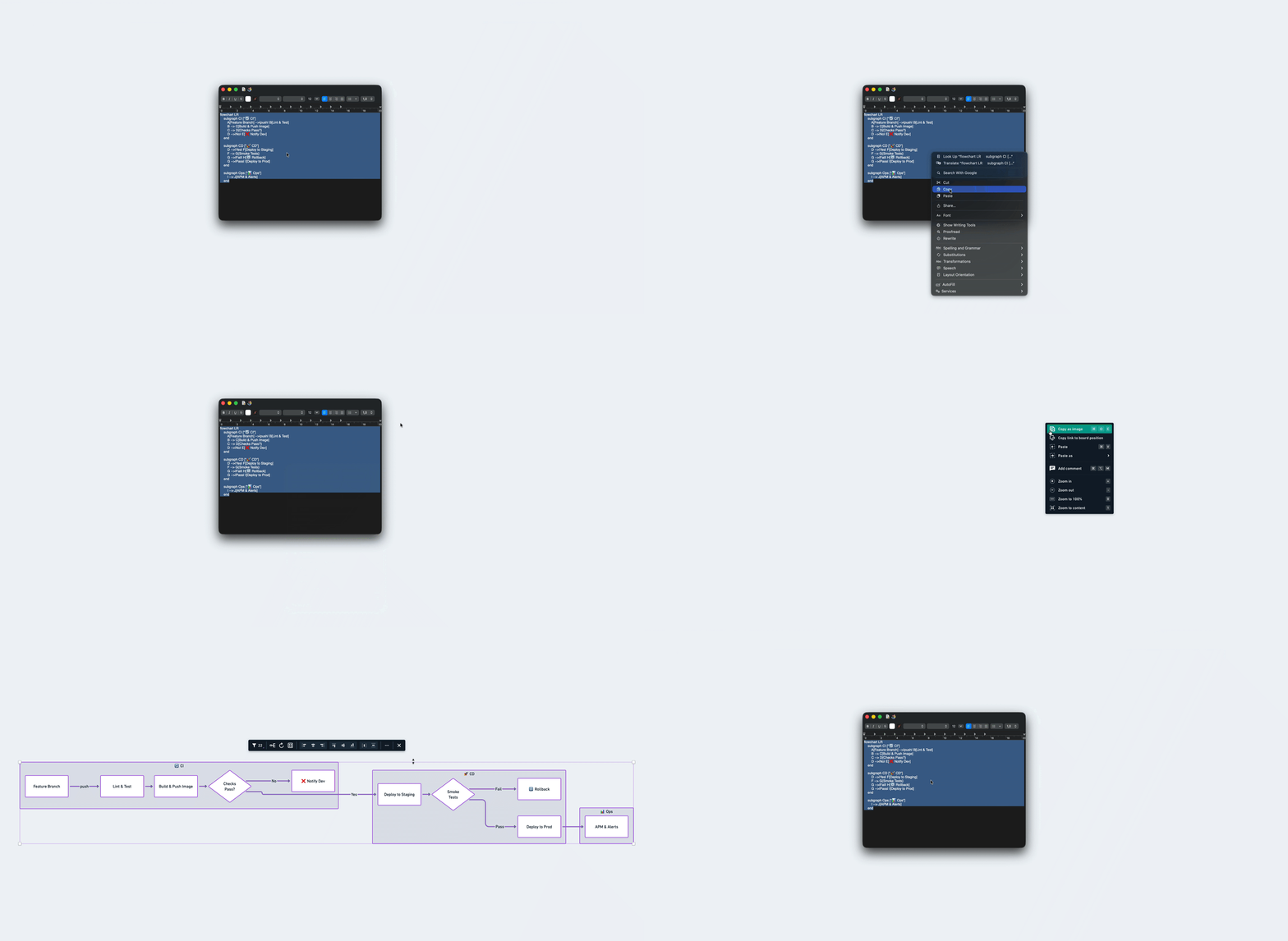
Supported diagram typesCopied!Link to this section
Start your code with any of these keywords. Each type becomes native Whimsical shapes, tables or stacks that you can edit like anything else on the board.
flowchartorgraph- Shapes and connectors, with subgraphs as groupsswimlane-beta- A flowchart whose top-level subgraphs become lanessequenceDiagram- A sequence diagram with notes, frames and activationsstateDiagram-v2- States, start and end dots, choices, forks, composite states and noteserDiagram- A table per entity, joined by crow's foot connectorsclassDiagram- A table per classrequirementDiagram- A table per requirement and elementC4Context,C4Containerand the other C4 diagrams - People, systems, containers and components inside their boundariesarchitecture-beta- Each service as its icon, in dashed groupsblock-beta- Blocks, groups and block arrows on the grid you writeusecase-beta- Actors as figures and use cases as ellipses inside their system boundarieseventmodeling- Frames in time order, each in the lane and color of its kindtimeline- Periods along arrows, with their events under themmindmap- A Whimsical mind mapkanban- A stack per column, with its cards in it
FlowchartsCopied!Link to this section
Pasted flowcharts come out much closer to how Mermaid draws them:
- Plain text or code blocks. Paste a chart as plain text or inside a
```mermaidcode block, frontmatter included. A frontmattertitleshows above the chart. - Every shape. All of Mermaid's shapes work, including Mermaid 11's newer syntax, like
A@{ shape: doc }. Each one becomes the closest Whimsical shape. - Formatted labels. Bold, italics and other formatting in labels is kept. Decision diamonds grow to fit their text, and long connector labels wrap.
- All link styles. Open links (
---) have no arrowhead, thick links (==>) are drawn as normal lines, and invisible links (~~~) only position their nodes.xandoends work too. - Subgraphs. Subgraphs become grouped shapes. They can be nested, and each can have its own
direction. - Colors. Style shapes and connectors with
classDef,class,:::,styleandlinkStyle. Colors snap to the closest color in your board's palette. - Forgiving. A line Whimsical can't read only drops that line, not the whole chart. A diagram too big to draw pastes as text, with a message saying why.
Horizontal and vertical layoutsCopied!Link to this section
Whimsical honors all of Mermaid's flow directions:
- TB top to bottom (TD “top down” also works)
- LR left to right
- RL right to left
- BT bottom to top
Without a direction, the chart is laid out top to bottom. For a horizontal chart, put "flowchart LR" at the top of your code:
If you're generating a flowchart with Whimsical AI, you can specify the layout direction in your prompt. For example, "Create a left-to-right flowchart of the user onboarding process."
ShapesCopied!Link to this section
[text]- Rectangle (so are(text),[[text]]and>text]){text}- Diamond (decision)([text])- Pill((text))- Circle{{text}}- Hexagon[(text)]- Cylinder[/text/]and[\text\]- Parallelogram[/text\]and[\text/]- TrapezoidA@{ shape: name }- Mermaid 11 shapes, matched to the closest Whimsical shape
ConnectorsCopied!Link to this section
-->- Arrow---- Line with no arrowhead-->|Label|or-- Label -->- Labeled arrow==>- Thick arrow (drawn as a normal line)<-->- Arrowheads at both ends-.-- Dashed line;-.->- Dashed arrowx--x- Diamond ends;o--o- Circle ends~~~- Invisible link (positions its nodes, no connector is drawn)A & B --> C & D- Multi-node connections
StylingCopied!Link to this section
classDef className fill:#hex,stroke:#hex- Define a style class:::classNameorclass A,B className- Apply a class to nodesstyle A fill:#hex- Style a single nodelinkStyle 0,1,2 stroke:#hex- Color specific connectors (0-based index)linkStyle 3 stroke:#hex,stroke-dasharray:5 5- Dashed connector
Note: :::className only works with a matching classDef. Without one, it's ignored, and the rest of the diagram still pastes.
ER diagramsCopied!Link to this section
Paste an erDiagram and you get tables joined by crow's foot connectors:
- Tables. Each entity becomes a table with its attributes, their keys (
PK,FK,UK) and comments. - Relationships. Each relationship becomes a labeled connector, dashed when it isn't identifying.
- Colors and groups.
classDef,classandstylecolor the table headings, and subgraphs become groups around their tables.
It also forgives common mistakes, like a relationship without a label or an attribute block that's never closed. Try it: copy this and paste it onto a board.
Kanban boardsCopied!Link to this section
Paste a kanban and you get real Whimsical stacks and cards, not shapes:
- Columns and cards. Each column becomes a stack with the column's name as its title, and each card becomes a card in that stack.
- Card details. A card's
ticket,assignedandprioritygo into its description. High priority cards are orange and Very High ones are red. - Both ways. Select stacks and choose Copy as… → Mermaid to get the kanban code back.
Try it: copy this and paste it onto a board.
Copy a diagram as MermaidCopied!Link to this section
You can copy flowcharts, ER diagrams, sequence diagrams, class diagrams, requirement diagrams and kanban stacks back out as Mermaid code for GitHub, Notion, GitLab or any other tool that renders Mermaid.
To copy a diagram as Mermaid code:
- Select the diagram you want to export.
- Right-click the selection and choose Copy as… → Mermaid from the context menu.
- Paste the Mermaid code wherever you need it.
- Selected tables, the connectors between them and the groups around them copy as an
erDiagram. - Flowcharts and ER diagrams keep their colors and direction. Colors are written as hex codes, so any Mermaid tool can read them.
- Quotes and
|in labels are kept, so the code pastes back exactly as it was. - Selected stacks copy as a
kanban, with each stack as a column and its cards in order. - Event models copy back out as a flowchart.
- Sequence diagram exports carry the participants, messages and arrow styles, but not colors.
For flowcharts, text colors come across too. Every styled shape carries an explicit text color in the exported code, so filled and outlined shapes (including subgraphs) keep readable labels in whatever tool you paste into. Shapes with no fill leave the text color out on purpose, so their labels follow the destination renderer's own light or dark theme.
Flowchart exports also set label wrapping on the whole diagram, so long labels that Whimsical reflows onto several lines reflow in other renderers instead of overflowing or getting clipped.
Nodes are output in topological order, so the code flows in the same direction as your diagram. This ensures compatibility with how tools like GitHub use text ordering to influence layout.
Sequence diagramsCopied!Link to this section
Paste a sequenceDiagram and you get everything Mermaid draws, not just participants and messages:
- Participants and messages, with solid and dashed arrows and two-way arrows.
- Notes beside or over participants.
- Frames:
loop,alt,opt,par,criticalandbreak. - Grouping:
rectbackgrounds andboxgroups of participants. - Lifelines: activation bars, and lifelines that end where a participant is destroyed.
- Numbering and titles:
autonumbernumbers your messages, and the diagram's title shows above it.
Cross, async and half arrowheads are drawn as plain arrows.
Use coding agents to build Mermaid diagrams with the MCPCopied!Link to this section
If you use a coding agent like Claude, Cursor, or Windsurf, you can connect it to Whimsical via the Whimsical MCP server. Then your coding agent can generate Mermaid diagrams and build them directly in your Whimsical workspace, without any copying and pasting.
It's a quick way to turn code, specs or prompts into any of the diagram types above. For example, you could ask your coding agent to:
- "Generate a flowchart of this authentication flow and add it to my Whimsical board"
- "Create a sequence diagram of the API calls in this file"
- "Draw an ER diagram of the data model in this schema in Whimsical"
- "Draw the architecture of this repo as an architecture diagram in Whimsical"
- "Turn the open issues in this project into a kanban board in Whimsical"