

- What is Whimsical?
- Getting started with flowcharts
- Getting started with mind maps
- Getting started with wireframes
- What can you do with Whimsical?
- Using Whimsical Boards
- How to create a new workspace
- AI-assisted mind mapping
- Working with Whimsical's infinite canvas
- 5 ways to create a new file
- Customizing file and folder icons
- Mentions in Whimsical files
- Customizing diagram shapes
- Getting started with sequence diagrams
- Using the command menu
- Getting started with flowcharts
- Getting started with mind maps
- Getting started with wireframes
- Using Whimsical Boards
- Mentions in Whimsical files
- Customizing diagram shapes
- Using sections on the Whimsical canvas
- Sketch on the canvas with freehand drawing
- Annotating files for more detail
- Adding and displaying links in Whimsical files
- Linking to sections and objects
- Uploading files to Whimsical
- How to draw a line
- How to filter selected objects
- Markdown support in Whimsical
- Presenting in Whimsical
- Voting on sticky notes
- Using the timer in boards
- Working with the grid and auto-alignment
- Working with connectors
- Does Whimsical have cloud architecture icons?
- Using tables in Whimsical
- Using sticky notes in boards
- Optimizing performance in larger boards
- Using spellcheck
- Setting custom thumbnails
- How overlays work in Wireframe mode
- Why are the colors of some board items toned down?
- Syntax highlighting in code blocks
- How to add emojis
- Commenting in Whimsical files
- Hiding cursors while collaborating
- Measure between objects in Boards
- Getting started with sequence diagrams
- Keeping boards tidy with alignment, distribution, and auto-layout
- Save default object style
- Import
- Text-to-object pasting options
- Working with Mermaid code in Whimsical
- Whimsical Agent
- Whimsical app for ChatGPT
- AI-assisted mind mapping
- AI Supplementary Terms
- Whimsical connector for Claude
- Whimsical connector for Grok
- How to get the most from your AI credits
- Using Whimsical with Microsoft Copilot Studio
- Whimsical plugin for Cursor
- Mobbin integration for wireframing
- MCP
- Whimsical MCP
- Whimsical MCP - supported tools
- Teams, workspaces & sections explained
- Free viewers commenting in workspaces
- Team FAQs
- Customizing file and folder icons
- Collaborating with others in real time
- Sharing files and managing access permissions
- How to switch between workspaces
- How to draw a line
- How to filter selected objects
- Markdown support in Whimsical
- Does Whimsical have cloud architecture icons?
- Embedding external content into Whimsical
- How overlays work in Wireframe mode
- Moving and copying files
- Using Whimsical on mobile
- File version history
- Why are the colors of some board items toned down?
- Does Whimsical support offline mode?
- Does Whimsical work on iPad?
- Whimsical desktop app
- Is Whimsical available in other languages?
- Inverting the zoom direction in Whimsical so it works more like Sketch
- Troubleshooting issues and reporting bugs
- How to add emojis
- How to restore deleted files from the trash
- Searching in your Whimsical workspace
- Organizing files in your workspace
- I’ve upgraded but still don’t have access to the paid features
- Why can't I edit my files?
- Reporting content in Whimsical
- Does Whimsical have an affiliate or referral program?
- Hiding cursors while collaborating
- Sharing feedback and feature requests
- Free plan limits
- Dark mode in Whimsical
- Notification inbox
- How to change or reset your password
- Inverting the zoom direction in Whimsical so it works more like Sketch
- Customizing your notifications in Whimsical
- How to verify your Whimsical account
- How to delete your account
- Adding your name and avatar to your account
- Changing your account email address, or adding a new one
- Updating the credit card details on your account
- How billing works in workspaces
- Updating your billing information
- I’ve upgraded but still don’t have access to the paid features
- How to cancel your subscription
- Pricing and discounts
- Where are my invoices
- Understanding your Whimsical invoice
- Sales tax and VAT
- How to create a new workspace
- Teams, workspaces & sections explained
- Free viewers commenting in workspaces
- Requesting file access
- Workspace discovery settings
- Sorting files and folders
- Changing workspace members’ roles
- Adding and removing members
- Team FAQs
- Creating and managing teams
- Requesting workspace editor access
- Linking between files
- Member roles in Whimsical
- How to delete a workspace
- How to upgrade your workspace
- Guest access
- Changing your workspace name, logo, or URL
- Collaborating with others in real time
- Offboarding users
- Sharing files and managing access permissions
- How to switch between workspaces
- Consolidating workspaces
- Uploading files to Whimsical
- SAML
- Setting up SAML session expiry
- Security
- Prevent new workspace creation
- Export
- Exporting content from Whimsical
- Embedding Whimsical files
- Import
- Importing to Whimsical
- Text-to-object pasting options
- Working with Mermaid code in Whimsical
- Switching to Whimsical
- Moving from Miro to Whimsical
- Moving from FigJam to Whimsical
- Moving from Lucidchart to Whimsical
- Moving from Lucidspark to Whimsical
- Moving from Excalidraw to Whimsical
- Moving from tldraw to Whimsical
- Moving from Canva to Whimsical
- Moving from Visio to Whimsical
- Moving from Mural to Whimsical
- Moving from draw.io to Whimsical
- Moving from Microsoft Whiteboard to Whimsical
- Whimsical app for ChatGPT
- Whimsical connector for Claude
- Whimsical connector for Grok
- Embedding & integrating boards with Jira Issues
- Integrating Whimsical with Google Docs
- Embedding files in ClickUp views
- Embedding files in Asana
- Creating Jira & Confluence Smart Links for Whimsical Files
- Embedding files in Guru
- Embedding files in Trello
- Embedding & integrating boards in Notion
- Integrating Whimsical and GitHub
- Embedding files in Zendesk
- Support Whimsical embeds in your app with EmbedKit
- Whimsical previews and notifications in Slack
- Embedding files in Canva
- Integrating Whimsical and Linear
- Embedding files in Nuclino
- Embedding files in Monday
- Embedding files in Medium
- Embedding files in Slab
- Embedding files in Coda
- Whimsical API (Beta)
- Embedding boards in Obsidian
- Using Whimsical with Microsoft Copilot Studio
- Mobbin integration for wireframing
- Export
- Embedding Whimsical files
- MCP
- Whimsical MCP
- Whimsical MCP - supported tools
- Reporting content in Whimsical
- SAML
- SAML SSO in Whimsical
- SAML SSO with Okta
- Setting up SAML session expiry
- SAML SSO with Auth0
- SAML SSO with OneLogin
- SAML SSO with Microsoft Entra ID (Azure AD)
- SAML SSO with Google Workspace (previously G-Suite)
- SAML SSO with Active Directory Federation Services (ADFS)
- SAML SSO with other identity providers
- Managing email changes with SAML and SCIM
- SCIM
- Setting up SCIM with Okta
- Setting up SCIM with JumpCloud
- Setting up SCIM with Entra ID (Azure AD)
- SCIM provisioning with Groups in Okta
- SCIM user provisioning in Whimsical
- SCIM provisioning with Groups in Entra ID (Azure AD)
- Security
- Setting up Two-factor Authentication (2FA)
- Prevent new workspace creation
- Whitelisting Whimsical domains
- Signing in with your Whimsical account on multiple devices
- Contact us
How to upgrade your workspace
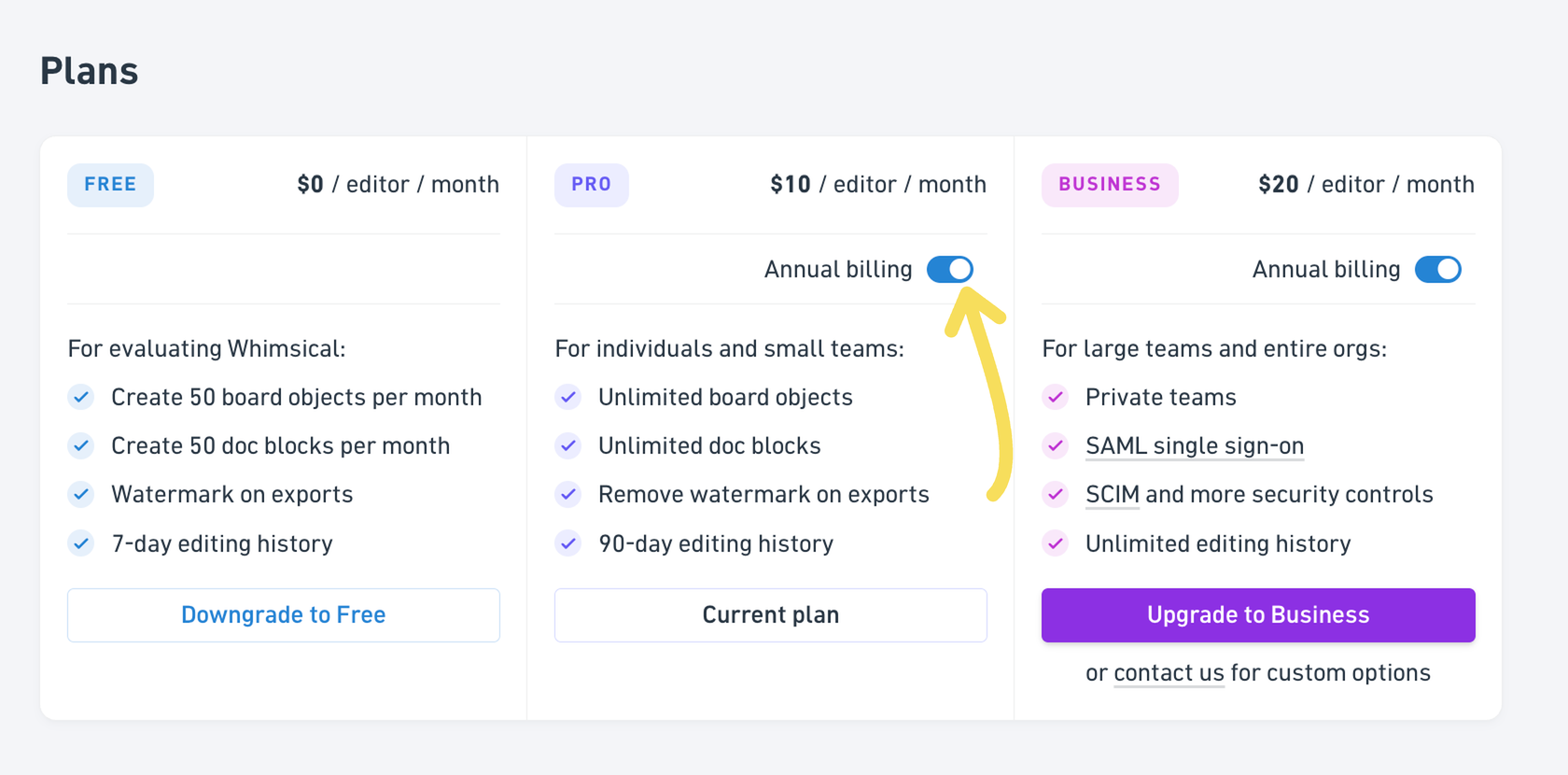
Whimsical's Free plan gives you 50 free monthly board objects and 50 doc blocks.
When you need more than that allowance, watermark-free exports, longer version history, or admin and security controls, you can upgrade your workspace to Pro or Business. This article explains what's included in each plan, how to upgrade, and how to switch between monthly and annual billing.
What's included in the Free plan?Copied!Link to this section
The Free plan gives you:
- Unlimited boards, docs and teams
- 50 board objects and 50 doc blocks per month
- Unlimited guests
- A Whimsical watermark on exports
- File uploads up to 5MB each, with 1GB total storage
- 7-day version history
- 10 AI credits per editor (lifetime total)
If you need more than this, you'll want to upgrade.
For a side-by-side comparison of all plans and limits, see the pricing page.
How much does Pro cost?Copied!Link to this section
Pro is $10 per editor per month when billed annually, or $12 per editor per month when billed monthly. Annual billing saves you roughly 17%.
Pro includes everything in Free, plus:
- Unlimited board objects and doc blocks
- Exports without a watermark
- File uploads up to 1GB each, with 100GB total storage
- 90-day version history
- Admin role controls
All plans include unlimited free viewers. For the full breakdown of roles, see Member roles in Whimsical.
How much does Business cost?Copied!Link to this section
Business is $20 per editor per month when billed annually, or $24 per editor per month.
Business includes everything in Pro, plus:
- SAML SSO
- SCIM and additional security controls
- Private teams
- File uploads up to 10GB each, 2TB total storage
- Unlimited version history
- User offboarding file transfers
- Priority support
If you need flexible payment terms, invoicing, custom security reviews or a custom MSA, contact sales.
How do I upgrade my workspace?Copied!Link to this section
- Go to Settings, then Billing, and click Upgrade plan. (Or open Plans in the Settings menu.)
- Choose how you'd like to pay. Switch Annual billing on to pay yearly and save around 17%.
- Click Upgrade to Pro or Upgrade to Business. You'll be taken to a secure Stripe checkout page.
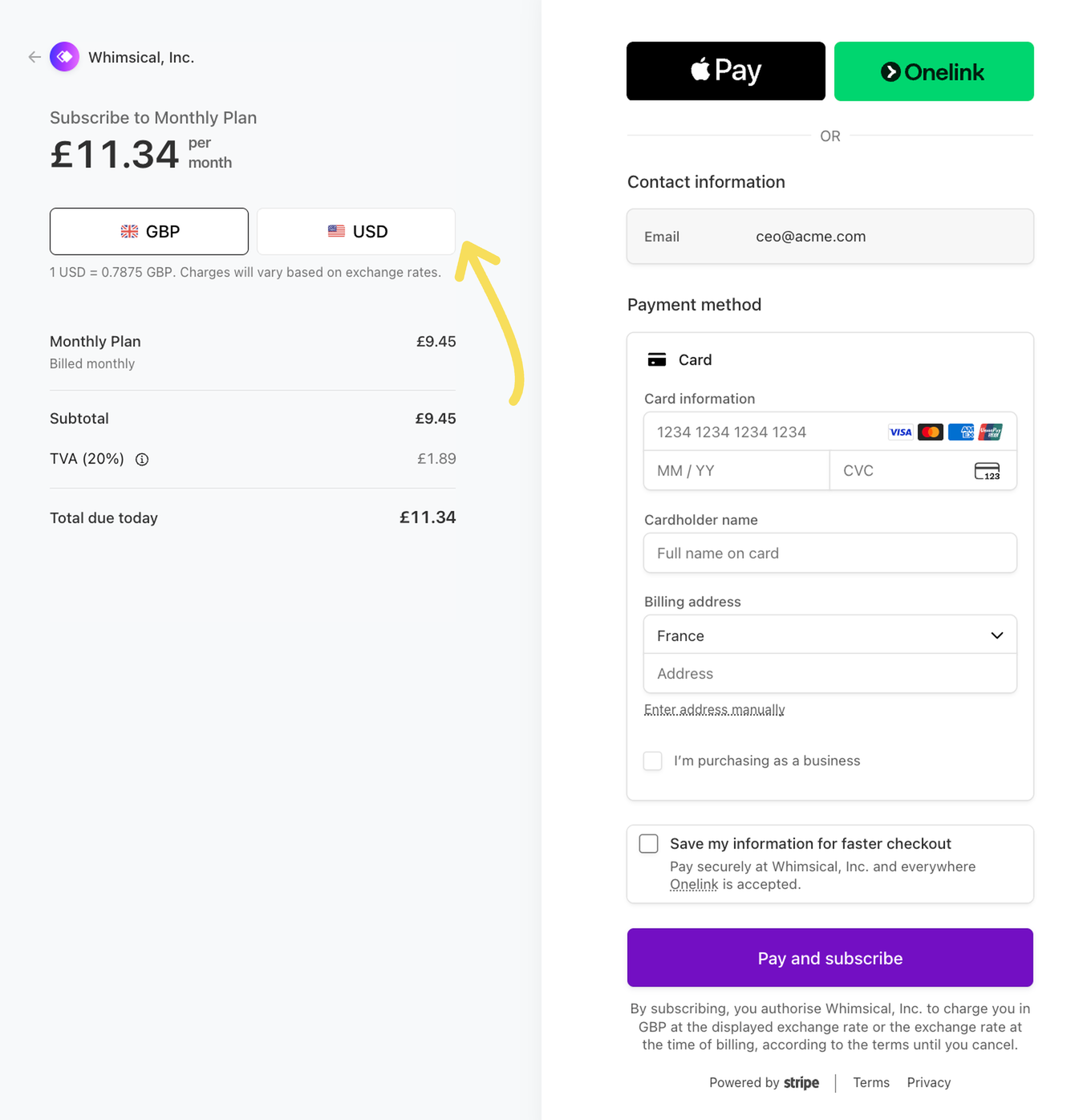
- Check the price and choose your currency (see below).
- Enter your payment details and billing address. If you're buying for a company, tick I'm purchasing as a business to add your business name and tax ID.
- Click Pay and subscribe.
You'll land back in Whimsical, and your upgrade applies within a moment. If you don't see your paid features straight away, refresh the page.
Note: Only workspace admins can upgrade a workspace.
Which currency will I pay in?Copied!Link to this section
Our prices are listed in US dollars (USD). On the checkout page you can pay in USD or in your local currency, converted at the exchange rate shown there.
Whichever currency you choose is the one you'll be charged in for as long as your subscription is active. You can't change it part way through your subscription.
If you pay in your local currency, the amount can vary slightly with the exchange rate each time you're billed.
How do I switch from monthly to annual billing?Copied!Link to this section
You can switch from monthly to annual billing yourself from the Billing page.
- Go to Settings, then Billing.
- Click Manage plan, then Switch to annual billing.
- Review the summary and click Confirm plan change. Your subscription updates immediately and the change is charged to your payment method on file.
How do I switch from annual to monthly billing?Copied!Link to this section
Switching from annual to monthly isn't available from settings. Contact us and we'll make the change for you!
Which plan is right for me?Copied!Link to this section
- Free: personal projects and lighter use. Unlimited boards, docs and collaborators, with a monthly allowance of objects and blocks.
- Pro: teams building in Whimsical every day, who need unlimited objects and blocks, exports without a watermark, and regular AI usage.
- Business: larger teams or organizations that need private teams, SSO/SCIM, advanced admin controls, higher storage, and priority support. Perfect for enterprise customers.
To compare every feature side by side, see the pricing page. If you're not sure which plan fits, get in touch - we’ll help you decide.