

- What is Whimsical?
- Getting started with flowcharts
- Getting started with mind maps
- Getting started with wireframes
- What can you do with Whimsical?
- Using Whimsical Boards
- How to create a new workspace
- AI-assisted mind mapping
- Working with Whimsical's infinite canvas
- 5 ways to create a new file
- Customizing file and folder icons
- Mentions in Whimsical files
- Customizing diagram shapes
- Getting started with sequence diagrams
- Using the command menu
- Getting started with flowcharts
- Getting started with mind maps
- Getting started with wireframes
- Using Whimsical Boards
- Mentions in Whimsical files
- Customizing diagram shapes
- Using sections on the Whimsical canvas
- Sketch on the canvas with freehand drawing
- Annotating files for more detail
- Adding and displaying links in Whimsical files
- Linking to sections and objects
- Uploading files to Whimsical
- How to draw a line
- How to filter selected objects
- Markdown support in Whimsical
- Presenting in Whimsical
- Voting on sticky notes
- Using the timer in boards
- Working with the grid and auto-alignment
- Working with connectors
- Does Whimsical have cloud architecture icons?
- Using tables in Whimsical
- Using sticky notes in boards
- Optimizing performance in larger boards
- Using spellcheck
- Setting custom thumbnails
- How overlays work in Wireframe mode
- Why are the colors of some board items toned down?
- Syntax highlighting in code blocks
- How to add emojis
- Commenting in Whimsical files
- Hiding cursors while collaborating
- Measure between objects in Boards
- Getting started with sequence diagrams
- Keeping boards tidy with alignment, distribution, and auto-layout
- Save default object style
- Import
- Text-to-object pasting options
- Working with Mermaid code in Whimsical
- Whimsical Agent
- Whimsical app for ChatGPT
- AI-assisted mind mapping
- AI Supplementary Terms
- Whimsical connector for Claude
- Whimsical connector for Grok
- How to get the most from your AI credits
- Using Whimsical with Microsoft Copilot Studio
- Whimsical plugin for Cursor
- MCP
- Whimsical MCP
- Whimsical MCP - supported tools
- Teams, workspaces & sections explained
- Free viewers commenting in workspaces
- Team FAQs
- Customizing file and folder icons
- Collaborating with others in real time
- Sharing files and managing access permissions
- How to switch between workspaces
- How to draw a line
- How to filter selected objects
- Markdown support in Whimsical
- Does Whimsical have cloud architecture icons?
- Embedding external content into Whimsical
- How overlays work in Wireframe mode
- Moving and copying files
- Using Whimsical on mobile
- File version history
- Why are the colors of some board items toned down?
- Does Whimsical support offline mode?
- Does Whimsical work on iPad?
- Whimsical desktop app
- Is Whimsical available in other languages?
- Inverting the zoom direction in Whimsical so it works more like Sketch
- Troubleshooting issues and reporting bugs
- How to add emojis
- How to restore deleted files from the trash
- Searching in your Whimsical workspace
- Organizing files in your workspace
- I’ve upgraded but still don’t have access to the paid features
- Why can't I edit my files?
- Reporting content in Whimsical
- Does Whimsical have an affiliate or referral program?
- Hiding cursors while collaborating
- Sharing feedback and feature requests
- Dark mode in Whimsical
- Notification inbox
- How to change or reset your password
- Inverting the zoom direction in Whimsical so it works more like Sketch
- Customizing your notifications in Whimsical
- How to verify your Whimsical account
- How to delete your account
- Adding your name and avatar to your account
- Changing your account email address, or adding a new one
- Updating the credit card details on your account
- How billing works in workspaces
- Updating your billing information
- I’ve upgraded but still don’t have access to the paid features
- How to cancel your subscription
- Pricing and discounts
- Where are my invoices
- Understanding your Whimsical invoice
- Sales tax and VAT
- How to create a new workspace
- Teams, workspaces & sections explained
- Free viewers commenting in workspaces
- Requesting file access
- Workspace discovery settings
- Sorting files and folders
- Changing workspace members’ roles
- Adding and removing members
- Team FAQs
- Creating and managing teams
- Requesting workspace editor access
- Linking between files
- Member roles in Whimsical
- How to delete a workspace
- How to upgrade your workspace
- Guest access
- Changing your workspace name, logo, or URL
- Collaborating with others in real time
- Offboarding users
- Sharing files and managing access permissions
- How to switch between workspaces
- Consolidating workspaces
- Uploading files to Whimsical
- SAML
- Setting up SAML session expiry
- Security
- Prevent new workspace creation
- Export
- Exporting content from Whimsical
- Embedding Whimsical files
- Import
- Importing to Whimsical
- Text-to-object pasting options
- Working with Mermaid code in Whimsical
- Switching to Whimsical
- Moving from Miro to Whimsical
- Moving from FigJam to Whimsical
- Moving from Lucidchart to Whimsical
- Moving from Lucidspark to Whimsical
- Moving from Excalidraw to Whimsical
- Moving from tldraw to Whimsical
- Moving from Canva to Whimsical
- Moving from Visio to Whimsical
- Moving from Mural to Whimsical
- Whimsical app for ChatGPT
- Whimsical connector for Claude
- Whimsical connector for Grok
- Embedding & integrating boards with Jira Issues
- Integrating Whimsical with Google Docs
- Embedding files in ClickUp views
- Embedding files in Asana
- Creating Jira & Confluence Smart Links for Whimsical Files
- Embedding files in Guru
- Embedding files in Trello
- Embedding & integrating boards in Notion
- Integrating Whimsical and GitHub
- Embedding files in Zendesk
- Support Whimsical embeds in your app with EmbedKit
- Whimsical previews and notifications in Slack
- Embedding files in Canva
- Integrating Whimsical and Linear
- Embedding files in Nuclino
- Embedding files in Monday
- Embedding files in Medium
- Embedding files in Slab
- Embedding files in Coda
- Whimsical API (Beta)
- Embedding boards in Obsidian
- Using Whimsical with Microsoft Copilot Studio
- Export
- Embedding Whimsical files
- MCP
- Whimsical MCP
- Whimsical MCP - supported tools
- Reporting content in Whimsical
- SAML
- SAML SSO in Whimsical
- SAML SSO with Okta
- Setting up SAML session expiry
- SAML SSO with Auth0
- SAML SSO with OneLogin
- SAML SSO with Microsoft Entra ID (Azure AD)
- SAML SSO with Google Workspace (previously G-Suite)
- SAML SSO with Active Directory Federation Services (ADFS)
- SAML SSO with other identity providers
- Managing email changes with SAML and SCIM
- SCIM
- Setting up SCIM with Okta
- Setting up SCIM with JumpCloud
- Setting up SCIM with Entra ID (Azure AD)
- SCIM provisioning with Groups in Okta
- SCIM user provisioning in Whimsical
- SCIM provisioning with Groups in Entra ID (Azure AD)
- Security
- Setting up Two-factor Authentication (2FA)
- Prevent new workspace creation
- Whitelisting Whimsical domains
- Signing in with your Whimsical account on multiple devices
- Contact us
Importing to Whimsical
Importing content into Whimsical lets you consolidate your work into one fast, collaborative platform. You can paste boards from most popular whiteboard and diagramming tools, import Visio and Markdown files, and turn text, Mermaid code or photos into editable diagrams.
Importing board contentCopied!Link to this section
There are several ways to bring board content into Whimsical:
- You can upload an image of content you have created elsewhere. We support JPG, JPEG, GIF, PNG, WEBP, SVG, and AVIF file formats.
- You can import text directly into boards as mind maps.
- You can paste Mermaid code directly into boards to create flowcharts or sequence diagrams.
- You can copy and paste boards from other tools, or import Visio files, as editable Whimsical objects. See the table below for a guide to each tool.
Switching from another toolCopied!Link to this section
TOOL | HOW TO BRING IT OVER |
|---|---|
Copy and paste | |
Copy and paste | |
Copy and paste | |
Copy and paste | |
Copy and paste | |
Copy and paste | |
Copy and paste (whiteboards and presentations) | |
Import a .vsdx file onto a board or folder |
Text import for mind maps Copied!Link to this section
To automatically turn text into a mind map, copy the text and paste it into Whimsical.
- Copy a list from a notepad, or a Google doc
- Select the main node of a mind map and hit paste
Paste Mermaid code as a flowchart or sequence diagramCopied!Link to this section
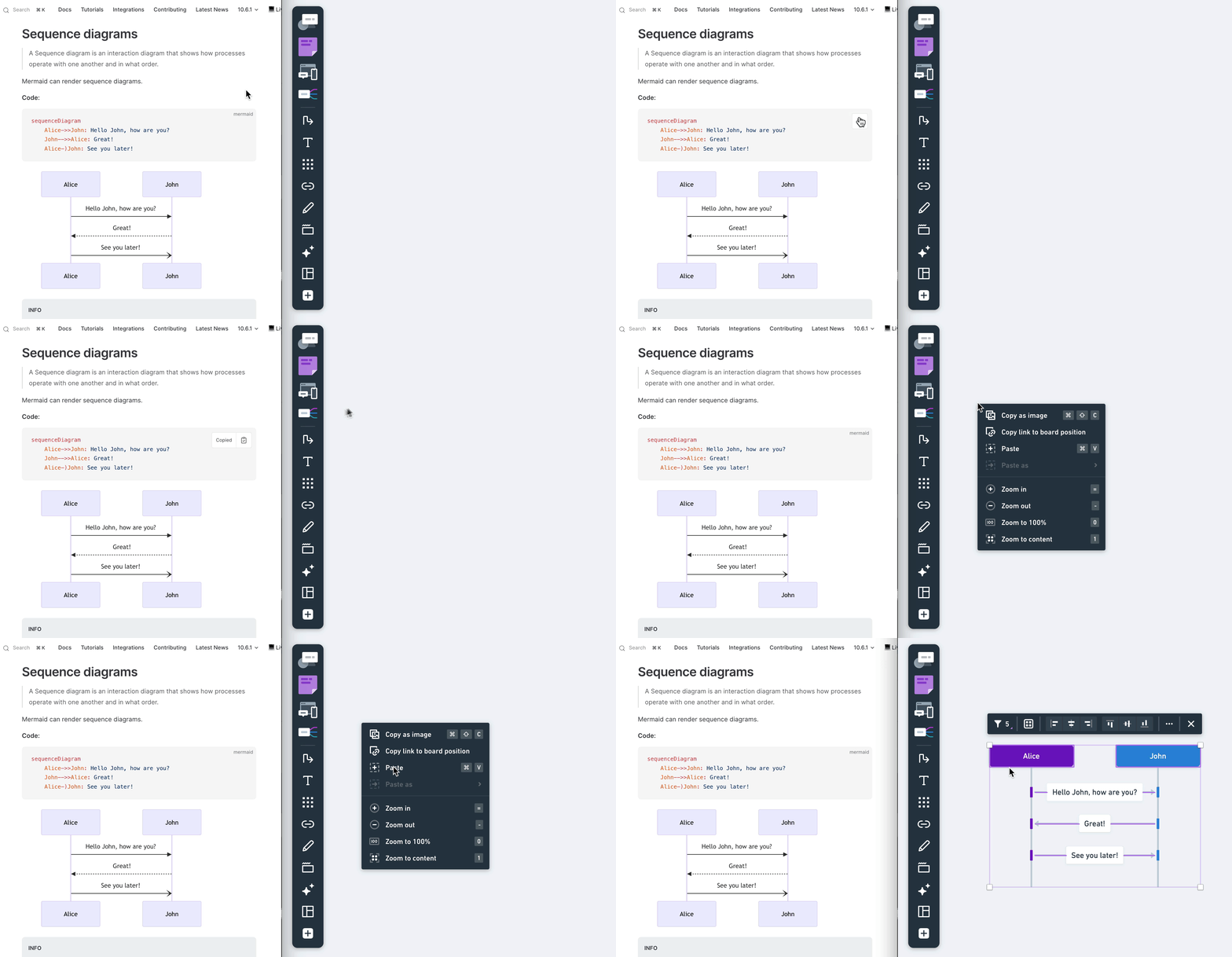
You can paste Mermaid code to Whimsical to turn your Mermaid diagrams into Whimsical flowcharts or sequence diagrams.
Pro tip: Try this custom GPT to convert images of your existing flowcharts into Mermaid code - perfect as a starting point to import diagrams from other board tools.
This should make it easier to bring in diagrams from other tools or documents and continue working on them in Whimsical.
You can currently import the following Mermaid diagrams:
- graph
- sequenceDiagram
- flowchart
Turn a photo into a Whimsical diagramCopied!Link to this section
Got a whiteboard full of ideas or a hand-drawn sketch? You can photograph it and use AI to bring it into Whimsical as an editable diagram.
Using the Whimsical MCP (with Claude or any MCP-compatible AI):
- Take a photo of your whiteboard, sketchbook, or sticky notes.
- Open your AI tool (e.g., Claude) and attach the photo.
- Ask it to turn the content into a Whimsical diagram.
- The AI will create it directly in Whimsical via the MCP connection.
Using the Whimsical app for ChatGPT:
- Take a photo of your whiteboard or sketch.
- Open the Whimsical app for ChatGPT and attach the image.
- Ask ChatGPT to convert the image into a Whimsical diagram.
- The app will generate the diagram, and you can open it in your Whimsical workspace.
This works with flowcharts, wireframes, sticky note layouts, and most hand-drawn diagrams. Anything you can photograph or capture as an image can become something you import to edit and share.
Importing docsCopied!Link to this section
You can import Markdown files directly as docs.
Drag and drop one or more .md or .markdown files onto any folder or section, and Whimsical will create a new doc for each file. The filename becomes the doc title, and any YAML frontmatter at the start of the file is converted into callout blocks at the top.
This works in folders and sections, not on boards or inside existing docs. Files larger than 1 MB are skipped.